Web Designer News brings the best web design news, tutorials and resources from leading publishers into one easy feed. We pull in articles from Smashing Magazine, Specky Boy, Web Designer Depot, Adobe, Designmodo and Just Creative, so you can follow UX design, CSS, typography, branding and front-end development without hunting across different sites. Every listing shows a short summary, the source and the publish date, and each link takes you straight to the original article on the publisher’s own website. That means you always read the full story where it was written, and the credit goes where it belongs.
Web design moves quickly. A new CSS feature, a Figma update or a change to accessibility guidance can alter how you work within a few weeks. Instead of opening a dozen tabs, you can scan one page and see what’s new, then dive into whatever matters to your projects. We don’t write these articles ourselves, so everything you read is the publisher’s own reporting and opinion, not our analysis. Bookmark this page, check back often, and keep up with the web design industry in a few minutes a day.

Cognition in talks to raise at a $75bn valuation, Bloomberg reports
Cognition, the startup behind the AI coding agent Devin, is in talks to raise money at a $75bn valuation, two months after its last round. Bloomberg’s Rebecca Torrence reported the talks on Friday, citing people familiar with the matter. The company is weighing a raise of $2bn or more, according…
Read more
One of Apple HomeView's best features will have you cooking like a pro
Apple makes cooking a blast with this new tool on its smart display. Apple makes cooking a blast with this new tool on its smart display.
Read more
Microsoft is retiring To Do, and personal users get no replacement
Microsoft will retire its To Do apps on 30 June 2027. People with personal accounts get no Microsoft replacement. Work and school users move to Planner, but Planner is not available on personal accounts, even for paying Microsoft 365 Personal and Family subscribers. Microsoft’s support page covers To Do on…
Read more
36 percent of households have ditched a streaming service subscription recently: Here's why
If you've cut back your streaming subscriptions recently, you're not alone. If you've cut back your streaming subscriptions recently, you're not alone.
Read more
Cursor may drop Chinese AI models as India’s Sarvam starts selling them
Cursor plans to explore dropping Chinese open-weight AI models because of “geopolitical risk”, a House investigation says. The SpaceX-owned coding platform built its flagship model, Composer 2, on Moonshot AI’s Kimi K2.5. CNBC’s Kai Nicol-Schwarz first reported the plan from an advance copy of the report. The House Homeland Security…
Read more
Giga Unveils the AD Italia redesign
Giga rebuilds AD Italia for its 45th anniversary: the AD Italia redesign pairs Arizona type, Ghirri colour and a modernist grid. The first thing you see is the masthead. AD sits in black flared serif ...
Read more
Common reasons why your iPhone keeps randomly turning off
If your iPhone's battery can't keep up with what you're doing or you overwhelm its hardware, it might shut down to protect itself. If your iPhone's battery can't keep up with what you're doing or you overwhelm its hardware, it might shut down to protect itself.
Read more
China’s tech giants double AI spending to $139bn as labs earn less than 8%
China’s AI companies face a money problem as well as a chip shortage, The New York Times’ Sui-Lee Wee and Li You reported on Friday. China’s biggest tech firms will double their AI spending this year. Their AI labs bring in a fraction of it. The figures come from a…
Read more
Waymo recalls robotaxis after they drove into closed freeway lanes
The recalls come after the California DMV banned Waymo from operating on its state freeways. The recalls come after the California DMV banned Waymo from operating on its state freeways.
Read more
Where you can find which GPU you have in your Windows PC
Your laptop may be running two graphics processors without you knowing it. Here are the built-in Windows tools that reveal what is powering your games. Your laptop may be running two graphics processors without you knowing it. Here are the built-in Windows tools that reveal what is powering your games.
Read more
John Roberts, the voice of Linda Belcher, is just happy to finish a thing
You probably know John Roberts best as the voice of Linda Belcher on Bob's Burgers. The show just wrapped up its 16th season and shows no signs of slowing down anytime soon. The show remains a reliable source of laughs, top-notch puns, and frankly wholesome fun. Comedy is just part…
Read more
Amazon’s first digital photo frame is up to 50 percent off for Black Friday
Amazon only announced its first digital photo frame less than a month ago, but it’s already getting a sizable discount for Black Friday. You can currently grab the Alexa Photo Frame at Amazon and Best Buy starting at $114 ($115 off), making it a great holiday gift for anyone who…
Read more
Is selling an AI version of your face to this microdrama startup the future of Hollywood?
An actor has licensed his face to a microdrama startup — in a trend that's already popular in China. Experts question the long-term consequences if this becomes a trend in Hollywood, too. An actor has licensed his face to a microdrama startup — in a trend that's already popular in…
Read more
Thinking Machines releases Inkling 2 Mini, a looped AI model for laptops
Thinking Machines Lab has released Inkling 2 Mini, an open-weights model small enough to run on a laptop. The lab says it leads every open-weights model under 100bn parameters on coding benchmarks such as DeepSWE. Mira Murati’s startup announced the model on Friday. Its trick is looping. Inkling 2 Mini…
Read more
Ways you can help your Fitbit's battery last longer
Fitbits don't last forever, but there's a couple easy ways you can get more years of step counts and heart-rate monitoring from your favorite wearable Fitbits don't last forever, but there's a couple easy ways you can get more years of step counts and heart-rate monitoring from your favorite wearable
Read more
The pros and cons of using a VPN over encrypted DNS
Explore the perks and drawbacks of choosing a VPN over encrypted DNS, from privacy and security to speed, costs, and control over your browsing habits. Explore the perks and drawbacks of choosing a VPN over encrypted DNS, from privacy and security to speed, costs, and control over your browsing habits.
Read more
Anthropic ends its first week worth $1.6tn as VCs count $25bn stakes
Anthropic ended its first week of trading worth $1.6tn on a fully diluted basis, CNBC’s Jordan Novet reported on Saturday. Only six US companies are worth more: Apple, Microsoft, Alphabet, Nvidia, Amazon and SpaceX. The shares closed at $88.91 on Friday, down 8.5% on the day. That gave back half…
Read more
China says it has built 1,260 5G factories as it tests 6G sensing for cars
China has built 1,260 5G factories and connected all 41 of its major industrial categories to its industrial internet, state broadcaster CCTV said, Bloomberg reported on Saturday. CCTV also said more than 26,000 private industrial 5G networks have been built. That does not match China’s industry ministry. In July, it…
Read more
Alaska, your next governor is a Wikipedia nerd
Jonathan Kreiss-Tomkins, Alaska's governor-elect, has made more than 13,000 WIkipedia edits. Jonathan Kreiss-Tomkins, Alaska's governor-elect, has made more than 13,000 WIkipedia edits.
Read more
Why your ping is terrible (even though you have fast internet)
Having a fast internet speed helps with online performance, but ping is the value that matters much more for games and video calls. Having a fast internet speed helps with online performance, but ping is the value that matters much more for games and video calls.
Read more
CrowdStrike is reportedly in talks to buy cybersecurity firm Zscaler
CrowdStrike is in talks to acquire Zscaler, Bloomberg reported on Friday. A deal would be one of the largest ever in cybersecurity. The report cites people familiar with the matter, who asked not to be named because the talks are confidential. They said a deal could come together soon, but…
Read more
How do those 'metal detector' apps for your phone actually work?
Your phone can be turned into something of a metal detector, but don't expect the range of a dedicated machine. Your phone can be turned into something of a metal detector, but don't expect the range of a dedicated machine.
Read more
Can Anthropic afford to put safety first?
Today, I’m talking with Hayden Field, The Verge’s senior AI reporter, about the Anthropic IPO for the third and final episode in our series about AI in real life. The AI lab behind Claude went public on the Nasdaq last Thursday. The numbers are gigantic, but not really that important…
Read more
China’s data regulator plans standards for measuring and billing AI tokens
China’s National Data Administration will improve standards for how AI tokens are measured, billed and checked for quality. The plan was set out in remarks by director Liu Liehong posted on the agency’s website on Saturday, Bloomberg reported. Tokens are the small units of text, audio and video that AI…
Read more
Trump says he will tax US companies that build data centres abroad
US companies that build data centres abroad will face a heavy tax, President Donald Trump said on Friday. He made the remarks at a White House press conference. He said he had not yet told his own officials and gave no details on how the tax would work. “We’re not…
Read more
Our go-to earbuds for taking calls have fallen to their lowest price to date
If you’re looking for a new pair of earbuds, the Soundcore Liberty 5 Pro are on sale for $129.99 at Amazon, Best Buy, and Walmart right now. That’s the lowest price we’ve seen for Anker’s excellent wireless earbuds, which normally retail for $169.99 and come in four colors (black, white,…
Read more
5 gadgets you should never buy used
Buying used tech could save you money, but some gadgets aren't worth the risk. Here's what you should avoid buying secondhand unless it's refurbished. Buying used tech could save you money, but some gadgets aren't worth the risk. Here's what you should avoid buying secondhand unless it's refurbished.
Read more
AWS got hit by an outage too. Here's why you didn't hear about it
If a service falls in the forest and nobody hears it... My editor asked me this week "why is everything except AWS breaking?"It's a great question! They haven't been in the headlines! In fact, as they are wont to do, AWS spokesperson Patrick Neighorn got salty to a reporter about…
Read more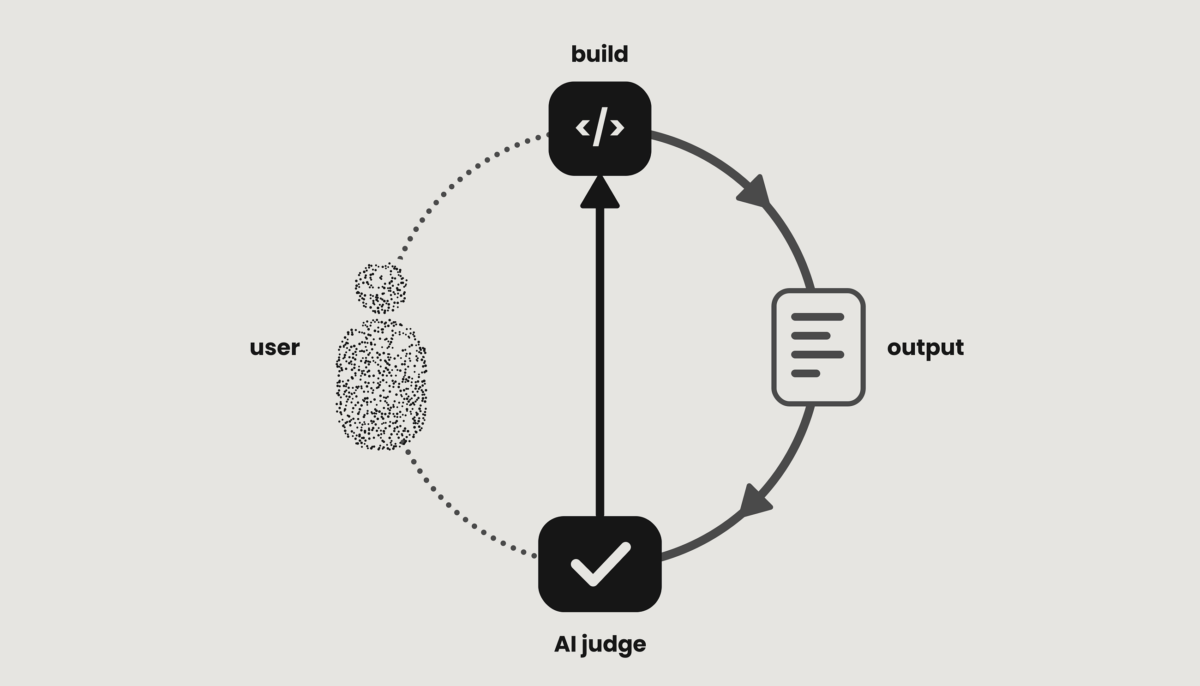
The judge used to be the user
AI collapsed the slow middle of building models. The people who once defined correct went with it.Continue reading on UX Collective » AI collapsed the slow middle of building models. The people who once defined correct went with it.Continue reading on UX Collective »
Read more
Why so many desktop PC cases have glass walls (and why you might not want that)
Tempered glass has taken over the PC case market. Learn what drives the trend and the trade-offs that could make a glass-panel build a poor fit for you. Tempered glass has taken over the PC case market. Learn what drives the trend and the trade-offs that could make a glass-panel…
Read more
Etsy says it will not use sellers' content to train AI after they revolt over policy changes
Etsy changed its terms of use, adding a clause on AI training. Now, it has clarified that it will not use sellers' content to train AI that can copy their work. Etsy changed its terms of use, adding a clause on AI training. Now, it has clarified that it will…
Read more
What data storage looked like in the early 2000s vs. today
We've come a long way in storage technology in just 25 years, from floppies and tiny USB drives to massive SSDs and cloud storage. We've come a long way in storage technology in just 25 years, from floppies and tiny USB drives to massive SSDs and cloud storage.
Read more
Book Design: Accidental Collage by Dr.Me & Waiting Room Press
Dr.Me and Waiting Room Press turn torn street posters into a 400-page book design, hand-ripping every cover of Accidental Collage. Every copy of Accidental Collage arrives damaged on purpose. Created ...
Read more
Why deep discounts on used Apple AirPods just aren't worth it
Before you click buy on used AirPods, learn about the risks most sellers never mention and the smarter ways to save on a brand new pair of earbuds. Before you click buy on used AirPods, learn about the risks most sellers never mention and the smarter ways to save on…
Read more
Chess.com’s next move is a new hub for classic games, from mahjong to sudoku
Chess.com is ready to go a lot bigger than chess. After launching Gambit, a gambling-free poker site, earlier this year, the company is now adding 10 more games: backgammon, checkers, go, hearts, mahjong, shogi, sudoku, solitaire, xiangqi, and a Scrabble alternative called word. They're all part of Chess's new Classic…
Read more
The pros and cons of using a dumb phone over a smartphone in 2026
Dumb phones are cheap and distraction-free, but you'll probably miss your smartphone. Dumb phones are cheap and distraction-free, but you'll probably miss your smartphone.
Read more
How to use Gemini Notebook to turn your research into an interactive site
Gemini Notebook's newest feature can create a website with visual aids and interactive elements (just double-check its work). Gemini Notebook's newest feature can create a website with visual aids and interactive elements (just double-check its work).
Read moreWhat you’ll find
The feed covers the parts of web design that change most often. Stories tend to fall into these areas:
- Web design trends and new visual directions
- UI and UX developments
- Responsive and mobile-first design
- Accessibility and inclusive design
- CSS and JavaScript updates
- Design tool and software releases
- AI and generative design
- Performance and site optimisation
Which stories appear depends on what the publishers post, so the mix shifts from day to day.
Web design tutorials
Many of the linked articles are tutorials, from HTML and CSS basics to responsive layouts, JavaScript, prototyping, animation and design software. Some suit people still learning the fundamentals, others help tighten an established workflow. Skim the summary, and if a technique looks useful, the link takes you to the full guide. Try it on a test page before you use it on a live client project.
UX, UI and usability
A website has to do more than look good. It has to be intuitive and accessible, or visitors leave. Expect stories on user-centred design, information architecture, wireframing, navigation, interaction design, mobile usability and user research. Most of them are about principles you can apply straight away.
Design inspiration and visual resources
Ideas turn up in odd places, so the feed includes creative work such as interfaces, branding projects, illustration and typography. Publishers also post practical resources, including UI kits, icons, templates, mockups and colour palettes. We don’t test or review these ourselves, so check the licence before you use anything in a client project.
Typography and web fonts
Type choices affect readability, hierarchy and how a brand feels. Articles cover web fonts, font pairing, variable fonts, responsive type, licensing and performance. A minimal interface and a bold brand site need very different type, so it helps to read how other designers approach the problem.
Photography and imagery
Strong imagery can make or break a page. Stories touch on photography, composition and editing, along with the technical side: responsive images, compression and assets that load quickly without looking soft.
Adobe and design tools
Adobe Creative Cloud is still central to many workflows, and Adobe is one of the publishers in the feed, so expect tutorials and updates for Photoshop, Illustrator and Adobe Express. Figma, collaborative design platforms, plugins and AI-powered tools turn up as well. Release news often comes from the vendor itself, so read it with that in mind.
WordPress, performance and SEO
WordPress runs a large share of the web, so theme and plugin news and tips for building faster sites appear regularly. Performance and SEO stories sit alongside them, because a design that loads slowly or can’t be found doesn’t do its job. Core Web Vitals, image handling, markup and accessibility all affect how a site ranks and how it feels to use.
Design systems and front-end development
Design systems and front-end development are where designers and developers meet. Stories cover component libraries, design tokens, modern CSS layout, JavaScript frameworks and handoff habits. If you work on either side of that line, they help you speak the same language as your colleagues.
AI in web design
AI is now part of everyday design work, from generating layouts and copy to speeding up repetitive tasks. The feed picks up stories on what these tools can do and where they fall short. Publishers differ in how sceptical they are, so read more than one before drawing conclusions.
What this site doesn’t do
A few limits are worth stating plainly. We don’t write the articles, so we can’t vouch for every claim in them, and the reporting and opinions belong to each publisher. We don’t review the tools, templates or tutorials that get linked. A story can also be out of date by the time you read it, so check the date before you act on it.
Who it’s for
Mostly people who design or build websites, whether freelance, at an agency or in-house. Front-end developers and UX researchers will find plenty, and students can use it to see how working designers talk about their craft. It works well as a coffee-break scan. It’s less useful if you want original opinion or in-depth tutorials written for this site.